12 Dating Photo Tips That Tripled Match Rates (2026 Data)
Data from 10M+ swipes reveals which dating photos get matches on Tinder, Hinge, and Bumble. Covers angles, lighting, outfits, and the one mistake killing your profile.
TL;DR: Dating profile photos account for 90% of first impressions on apps like Tinder, Hinge, and Bumble. The highest-performing profiles use natural light (golden hour or overcast days), genuine smiles, fitted clothing in solid colors, and a varied 6-photo lineup covering headshot, full body, activity, social, lifestyle, and personality shots. AI photo tools like LensCherry can generate polished, dating-optimized variations from a few selfies to complement your real candid photos.
Looking for Hinge photo order specifically? Read Best Hinge Photo Order. This guide is the broader fundamentals page for lighting, angles, outfits, and app-wide dating photo strategy.
Last updated: March 2026
Your Photos Are Doing Most of the Work
Let's be honest: on dating apps, your photos are your first impression, your resume, and your opening line, all rolled into one. Research from Hinge shows that profiles with high-quality photos are significantly more likely to receive likes than those with blurry or poorly lit images. A 2024 Photofeeler study found that perceived attractiveness in photos can vary by as much as 3 points out of 10 just based on lighting and angle, same person, different photo, wildly different results.
So before you stress about your bio or opening message, let's get your photos right.
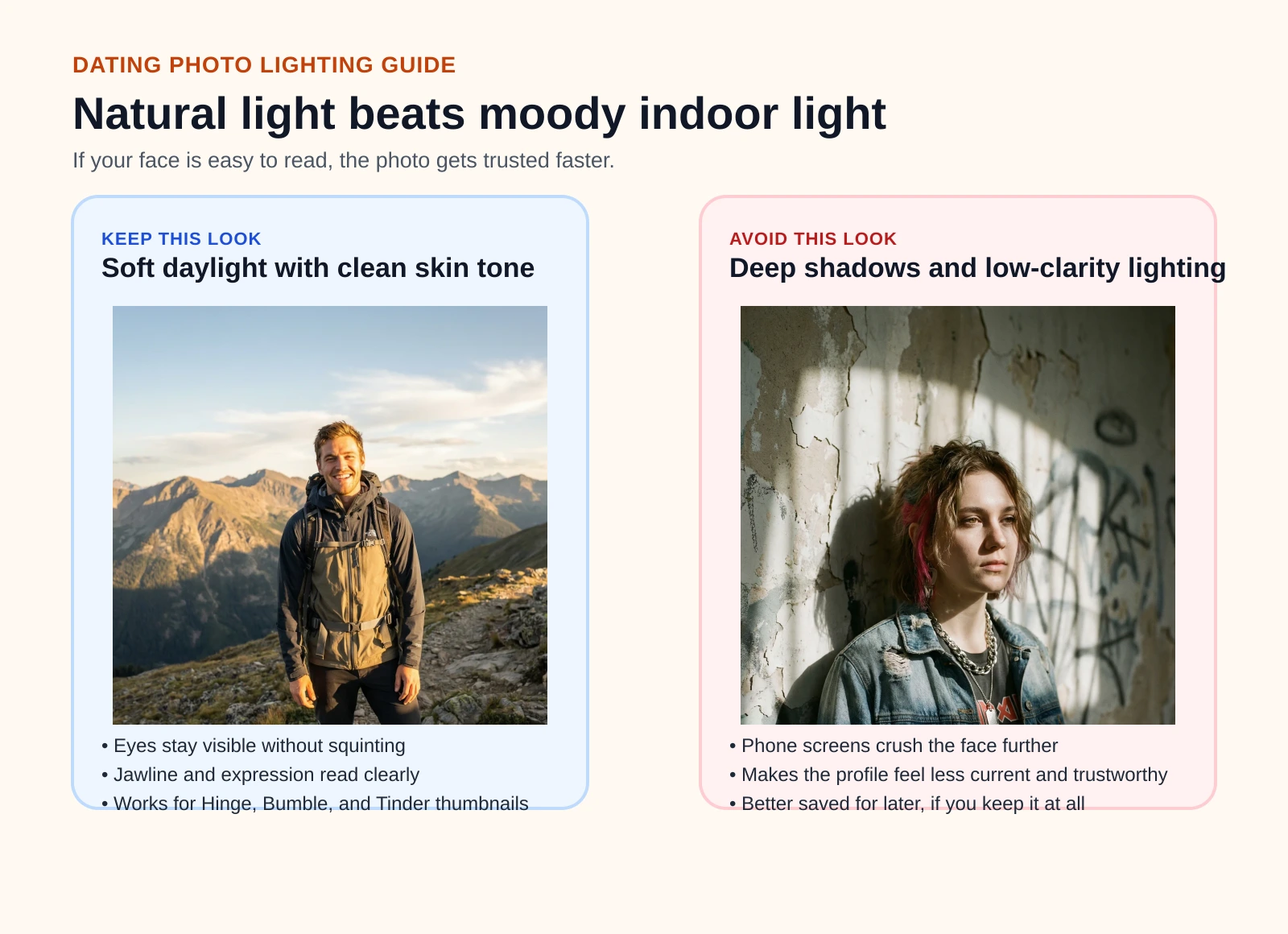
Lighting: The Single Biggest Factor
If you take one thing from this guide, let it be this: good lighting changes everything.
Natural Light Is King
Golden hour (the hour after sunrise or before sunset) produces warm, flattering light that softens features and adds dimension
Overcast days act like a giant softbox, even, diffused light with no harsh shadows
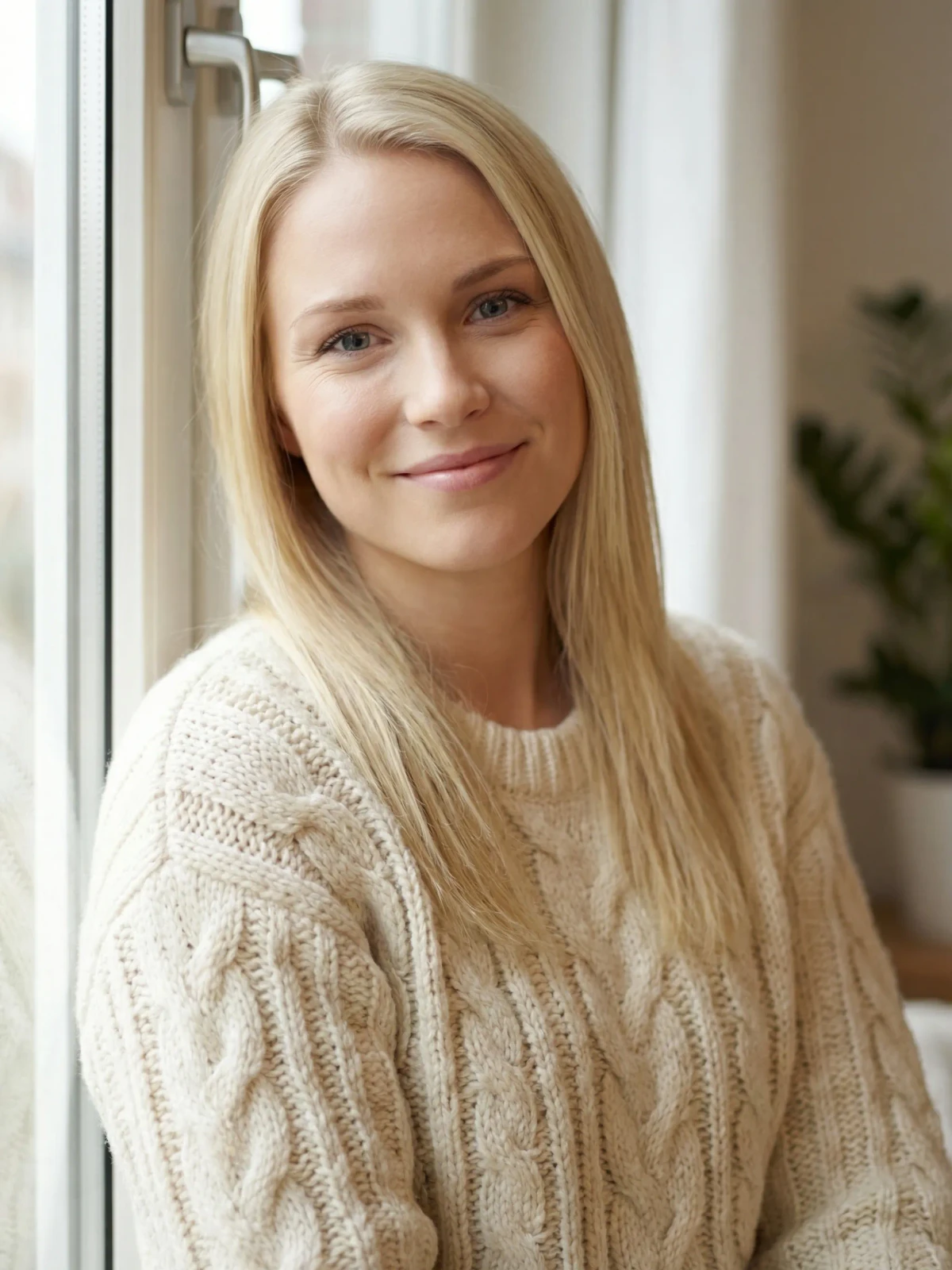
Window light works great indoors. Stand facing a window (not beside it) for soft, directional light on your face
Open shade (under a tree or overhang on a sunny day) eliminates squinting and harsh shadows
What to Avoid
Direct flash, it flattens your face and creates that deer-in-headlights look
Overhead fluorescent lighting, adds unflattering green-yellow tones and under-eye shadows
Backlighting (light behind you), makes your face a silhouette unless you specifically compensate for it
Harsh midday sun, creates deep shadows under your eyes, nose, and chin
Quick test: If you can see hard-edged shadows on your face, the light is too harsh. Move to softer light.
Angles and Framing
The difference between "they look great" and "they look okay" often comes down to camera position.
Camera Height
Eye level or slightly above is universally flattering. It defines the jawline and makes eyes appear larger
Below eye level can look unflattering, it emphasizes the chin and nostrils
Way above (bird's eye selfie) looks dated and try-hard. Skip it
Distance and Cropping
Head and shoulders for your main photo, close enough to see your face, far enough to show some personality
Waist-up shots work great for showing outfits and body language
Full body shots are important to include (people want to see the whole picture), but don't lead with them
No extreme close-ups, nobody wants your pores as their first impression
Composition
Rule of thirds: Don't always center yourself perfectly. Slightly off-center can feel more natural and dynamic
Leave space in the direction you're looking
Clean background, your viewer's eye should go to you, not the pile of laundry behind you
What to Wear
Your outfit says a lot before anyone reads your bio.
Colors That Work
Solid colors photograph better than busy patterns
Blues, greens, burgundy, and earth tones are universally flattering and convey warmth
Avoid all-black, it can look heavy in photos and doesn't photograph well in low light
White or cream works well against natural backgrounds
Style Guidelines
Wear something you'd actually wear on a date, aspirational but authentic
Fitted clothing looks better than baggy in photos
Avoid logos and graphic tees, they're distracting and can be polarizing
Layers add visual interest, a jacket over a shirt, a scarf, rolled sleeves
This is where most people freeze up. "How do I smile naturally for a camera?"
The Smile
Think of something genuinely funny right before the photo. A real smile engages the muscles around your eyes (called a Duchenne smile), fake smiles don't
Laugh. Seriously. Have a friend tell you a joke mid-shoot. Candid laughing shots consistently rate highest on Photofeeler
Closed-mouth smiles are fine if that's more natural for you, not everyone needs teeth
Slight smile with eye contact reads as confident and approachable
Body Language
Open posture, uncrossed arms, shoulders back, facing the camera (or slightly angled)
Lean slightly forward, it communicates engagement and interest
Hands doing something look more natural than hands awkwardly at your sides, hold a coffee, put a hand in your pocket, lean on something
Avoid the stiff pose. Movement creates better photos. Walk, turn, look over your shoulder
Photo Order: Building Your Profile
You've got 6-9 photo slots. Use them strategically. If your main problem is Hinge photo order, jump to our dedicated Best Hinge Photo Order guide. The sequence below is the broader cross-app version.
The Formula
Photo 1: Your best face: Clear, well-lit headshot or head-and-shoulders. Smiling. This is 90% of the swipe decision
Photo 2: Full body: Show your build and style in a natural setting
Photo 3: Activity shot: Doing something you enjoy (hiking, cooking, playing guitar, not posing with a sedated tiger)
Photo 4: Social proof: You with friends. Shows you're a normal, social human. But make it obvious which one is you
Photo 5: Lifestyle/travel: A shot that sparks conversation, interesting location, cool experience
Photo 6: Wildcard: Your pet, a candid laughing shot, or something that shows personality
Variety Matters
Mix indoor and outdoor settings
Mix casual and slightly dressed up
Show different sides of your personality, you're a complex person, show it
Vary your expressions, not the same smile in every photo
Need photos, not another checklist?
Get dating-profile options with better light, framing, and outfit range
Start with a few clear selfies and generate polished dating photos that still look like you. It is a quick way to add a stronger lead shot, a cleaner full-body option, or one dressed-up closer.
Start free with 3 credits and keep the shots that improve your current profile.
Helpful when you have decent candids but no strong opener
Works best when you mix polished shots with real-life photos
No app download needed to get started
What's Changed for Dating Photos in 2026
Dating apps keep evolving, and your photos need to keep up. Hinge now features photo prompts that let you add context to each image, so pick photos that tell a story worth captioning. Bumble has doubled down on verification, meaning your photos need to actually look like you (no heavy filters, no five-year-old pics). And Tinder rolled out AI photo detection in late 2025, which flags obviously generated images. The takeaway: authentic, high-quality photos matter more than ever. If you use AI tools, blend them with real candid shots.
Platform-Specific Advice
Each app has its own culture and what works best differs.
Hinge
Hinge is designed for "designed to be deleted", it skews toward relationship-seekers. Your photos should feel authentic and conversational.
Prompts and photos work together. Choose photos that tell stories your prompts can reference
Candid shots outperform posed ones on Hinge
Voice prompts and video are available, use them to stand out
Hinge users look at entire profiles more carefully, so your 5th and 6th photos matter more here
Free plan includes 3 credits so you can test the workflow before paying.
Use it for your lead photo, full-body slot, or dressed-up closer
Keeps the signup path clear for readers ready to act
Pair the polished shots with real candid photos for trust
Related Articles
The Mystery Group Photo. If someone has to guess which person you are, that's an automatic left swipe
Bathroom selfies. Just.. no. There's a toilet behind you. That's not the vibe
Fish photos. We get it, you caught a fish. Unless fishing is genuinely your life, skip it. (And if it is, make it one photo, not three)
Car selfies. The lighting is usually terrible, the angle is unflattering, and the seatbelt isn't attractive
Heavy filters. If your skin looks airbrushed into oblivion, people assume you're hiding something. Light editing is fine, face-morphing filters are not
Only group photos. You need at least 3-4 solo shots
Subtle Mistakes
Same expression in every photo, you look robotic
Same location in every photo, you look like you only have one shirt and one room
Outdated photos, if you've changed significantly, update them. Catfishing isn't a strategy
Dark, blurry, or pixelated photos, they signal low effort, which people extend to "low effort dater"
No full body shots, people will assume you're hiding something
The AI Alternative
Not everyone has a photographer friend, a great camera, or the time to organize a full photo shoot. That's where AI headshot tools come in.
Tools like LensCherry can generate dating-ready photos from just a few selfies. You upload casual photos of yourself, and the AI creates polished, professional-looking images in different styles, dating-focused, LinkedIn-ready, or just general headshots.
Why it works for dating profiles:
Variety without the shoot. Get photos in different outfits, backgrounds, and lighting conditions without leaving your apartment
Professional quality. The AI handles lighting, framing, and composition, the exact things we covered above
Low commitment. LensCherry's free tier gives you 3 credits to try it. Quick Shots generates results in minutes
No awkward posing. If you freeze up in front of a camera, this sidesteps the problem entirely
That said, AI photos work best when mixed with real photos. Your profile should include genuine candid shots, at events, with friends, doing activities. Use AI-generated photos for your polished headshots and mix them with authentic moments.
Getting the order right matters just as much as the photos themselves. Here's the sequence that performs best across Hinge, Bumble, and Tinder in 2026:
Lead with your strongest face shot. Clear lighting, genuine smile, just you. This photo gets 90% of the swipe decision, so make it count.
Second photo: personality or hobby. Show what makes you interesting. Cooking, climbing, painting, playing music. Pick something that invites a question.
Third: social context. You with friends at a dinner, a concert, a hike. Proves you're a real person with a real life. Make sure it's obvious which one is you.
Fourth: full body shot. People want to see the whole picture. A well-lit outdoor shot in clothes you'd actually wear on a date works perfectly.
Fifth: something unexpected. Your dog, a travel moment, a candid laugh. This is your conversation starter.
Sixth: the wildcard. Dressed up at an event, doing something adventurous, or a creative portrait. End on a high note.
On Hinge specifically, this order pairs well with their photo prompt feature. Each slot becomes a mini-story when you add context. For app-specific advice, check our dedicated guides for Hinge, Bumble, and Tinder.
Dating Photo Tips by App
Each dating app rewards slightly different photo strategies. Here's the quick version:
Hinge
Hinge users browse full profiles before deciding, so your later photos matter more here than anywhere else. Use photo prompts to add context. Candid shots outperform posed ones. Voice prompts and video help you stand out. Full Hinge photo guide.
Bumble
Women message first on Bumble, so your photos need to give them something to open with. Lead with a strong face shot, include at least one hobby photo, and keep group shots to a minimum. The audience skews slightly professional, so polished photos perform well. Full Bumble photo guide.
Tinder
Tinder is fast. You have seconds, not minutes. High-contrast, eye-catching first photos win. Quality beats quantity here. An interesting backdrop or activity in your first two photos helps stop the scroll. Full Tinder photo guide.
Hinge Photo Order: Quick Version
Hinge treats your first photo differently than other apps. It displays as your "cover" photo in the Discover feed, taking up most of the screen before someone scrolls into your profile. That makes your lead photo more important on Hinge than on Bumble or Tinder.
Here is the short version that works best:
Slot one: your best face photo. Clear, well-lit, smiling, just you. This is your cover image.
Slot two: full-body or activity shot. Show what you actually look like and what you do.
Slot three: social photo. You with friends at a dinner, a wedding, or a concert where you are easy to identify.
Slots four through six: variety. Mix in hobbies, travel, a dressed-up shot, and one relaxed candid.
If you are optimizing specifically for Hinge, read the full Best Hinge Photo Order guide. It goes deeper on what each slot should do, the exact six-photo sequence, and how to pair photos with prompts. For more on building a complete Hinge profile with AI-enhanced photos, check out our Hinge photo guide.
AI Dating Photos vs Professional Photography
The traditional path to great dating photos meant hiring a photographer. You would book a 1-2 hour session, pick locations, plan outfits, and pay $150-$400 depending on your city. Some photographers now specialize in dating profiles, charging $200-$600 for dating-specific packages with multiple looks and locations.
The upside: a skilled photographer directs your poses, handles lighting, and edits the final images. You get high-quality photos in settings that would be hard to replicate alone. The downside: scheduling, commute time, the awkwardness of posing for someone you just met, and cost. Most people need 3-4 "hero" shots for their profile. At $300-$500 per session, that is expensive for photos you will replace in 6-12 months when your look changes.
AI photo tools like LensCherry hit different. Upload 3-6 selfies, pick the Dating style category, and get dozens of variations in minutes. Different outfits, different lighting, different backgrounds. Total cost: free to start (3 credits), or credit packs from $4.99 for more. The quality gap between AI-generated dating photos and professional photography has narrowed significantly in 2026. At normal viewing sizes on Hinge, Bumble, or Tinder, the difference is negligible.
The best strategy for most people: use AI tools for your polished headshots (slots 1 and 4 in your lineup) and real photos for candid moments (activities, social shots, travel). This gives you both quality and authenticity. If you want to compare costs in more detail, our AI photos vs professional photographer breakdown covers the full picture.
The Bottom Line
Great dating photos aren't about being the most attractive person on the app. They're about presenting yourself clearly, confidently, and authentically. Good lighting, a genuine expression, and a little variety go a long way.
Start with the basics:
Find great natural light
Get the camera at eye level
Smile like you mean it
Show variety in settings and outfits
Lead with your best shot
And if you want a shortcut for the polished headshots, give LensCherry a try, it's free to start.